
- RoleLead Product Designer
- CompanyMTN Nigeria
- PlatformWeb · Enterprise B2B
- TeamSenior designer (lead direction) + 3 designers · 1 PM · 3 engineers · 13+ depts
- Timeline14 weeks, discovery to launch
Overview
One system, thirteen truths
MTN's enterprise business unit ran every commercial bid through thirteen-plus internal teams, Legal, Finance, IT, Risk, HR, Pricing, and more, with no shared system of record. I led design end to end: discovery, information architecture, permissions, UI, and handoff, for a portal that gave every team a single, role-aware view of bid status, replacing email threads and spreadsheets with one source of truth.
As senior/first-among-equals, I set the design direction and coordinated three other designers, running weekly critiques and dividing ownership by section to keep quality and consistency high against a 14-week deadline.
Constraints
What I was designing within
01 — Business Problem
No shared system of record
For a business unit where bid turnaround time is directly tied to revenue, the absence of shared visibility wasn't a workflow inconvenience, it was a competitive risk.
- No single source of truth for bid status across 13+ teams
- SLA breaches only surfaced after a deadline had already passed
- Reporting was manual, built by chasing data across departments
- Onboarding a new stakeholder into an in-flight bid had no structured path
Thirteen-plus teams, five different tracking methods, converging on nothing.
Thirteen-plus teams tracked status independently via email threads, spreadsheets, verbal updates, and memory, converging on nothing.
02 — User Problem
Visibility needs were role-bound, not bid-bound
Discovery sessions across all thirteen departments surfaced a consistent pattern: everyone needed visibility, but no two teams needed the same slice of it. The real design problem wasn't "build a dashboard", it was: build one system that shows thirteen different teams thirteen different truths from the same dataset.
| Bid analyst | Dept. stakeholder | Leadership | |
|---|---|---|---|
| Sees | All bids, all departments | Only bids naming their department | Aggregate trends by region/period |
| Can do | Create, edit, assign, close bids | Respond, upload, update own status | View reports, export, no editing |
| Primary need | Operational control of the full pipeline | Clarity on what's expected, by when | Pipeline health, no operational noise |
The artifact that ruled out a single universal dashboard.
03 — Research & Discovery
13 sessions, 3 themes
I ran structured discovery sessions with representatives from each of the thirteen stakeholder departments to understand what they currently used to track bid status (spreadsheets, email, memory), what information they needed to act versus what was just "nice to know", and where in the bid lifecycle they typically got blindsided by a missed handoff or deadline.
That input, thirteen sessions' worth of interview notes and workflow walkthroughs, synthesized into three findings that shaped everything downstream:
From raw, messy stakeholder input to three clear themes, and the design direction they produced.
04 — IA & Permissions
One shell, role-aware content
Before any screen, I built a permissions matrix: every stakeholder role mapped against what they could see, edit, and access. That matrix became the spine of the IA. Navigation stayed identical for everyone, what rendered inside each section changed by role. One shell, role-aware content, rather than thirteen bespoke experiences to maintain.
| Section | Bid analyst | Dept. stakeholder | Leadership |
|---|---|---|---|
| Dashboard | Full view + create bid | Scoped to own dept. | Aggregate only |
| Bid Management | Full edit + create bid | Respond only | No access |
| Reporting | Operational reports | No access | Strategic reports |
| Admin & SLA | No access | No access | Full edit |
| Message Center | All bid threads | Own bid threads only | Read only |
Only the Bid Analyst role sees the "New bid request" button. All other roles see the same nav shell without that action.
Four sections, one shell. Role-conditional rendering keeps the nav identical while personalising every surface beneath it.
05 — The Solution
Five sections, three roles, one shell
Every section of the portal was designed for every applicable role: starting from a low-fidelity wireframe, then built to pixel-precise hi-fi using MTN's Raanaa design system tokens. The same navigation shell delivers a different experience depending on who is signed in, and exactly one role can initiate a new bid request.
I divided the five sections across the team by designer strength and stakeholder familiarity, one designer per section, then reviewed every screen against the permissions matrix in weekly critique so the system read as one coherent product rather than five separately designed pieces.
The first screen every user lands on. The shell is identical, what renders inside changes by role.
Lo-fi wireframe, common shell
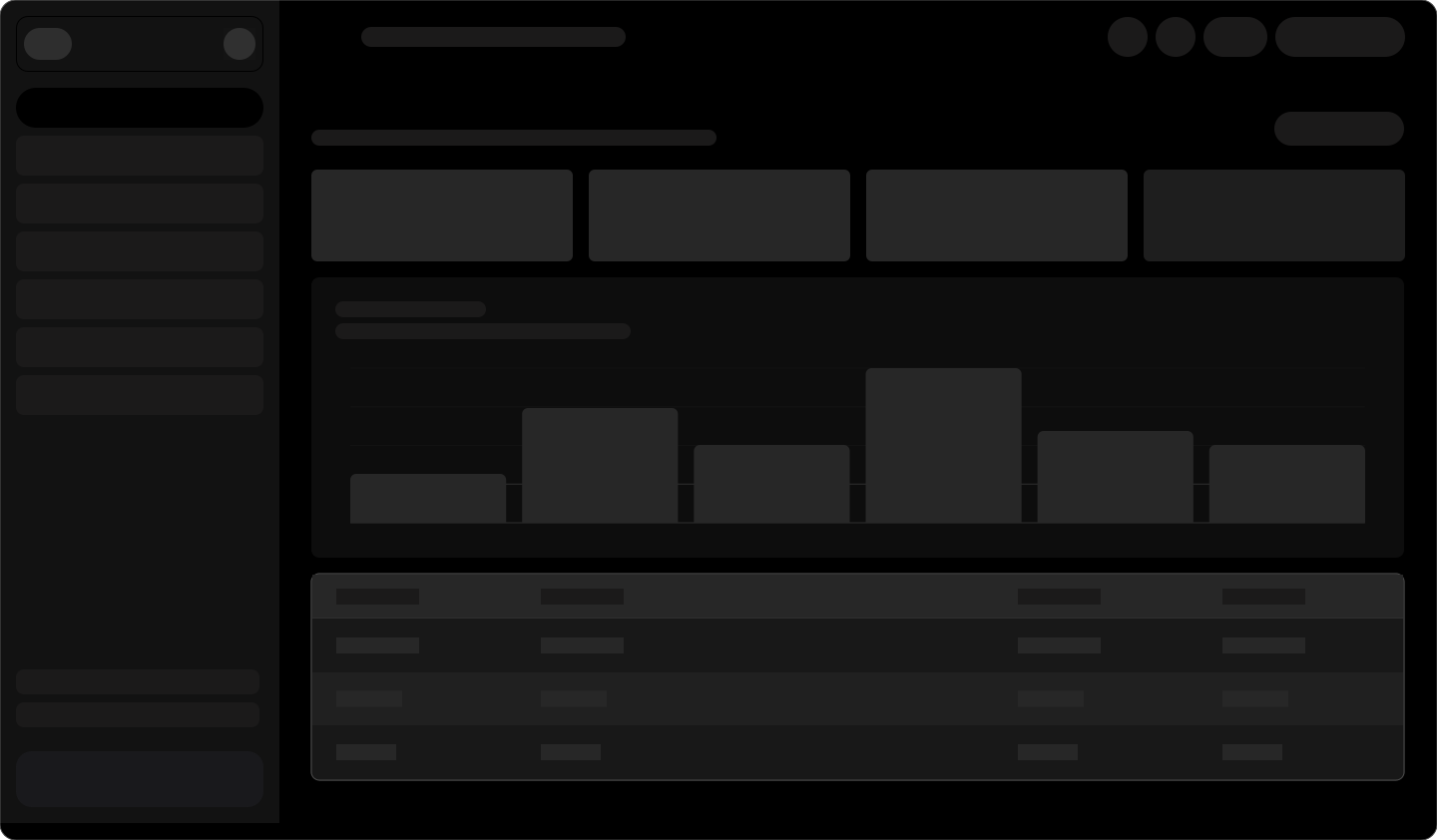
Sidebar + 4 metric cards (SLA card highlighted) + trend chart + recent bids table. "New bid request" button top-right for Analyst role only.
Hi-fi, Bid Analyst
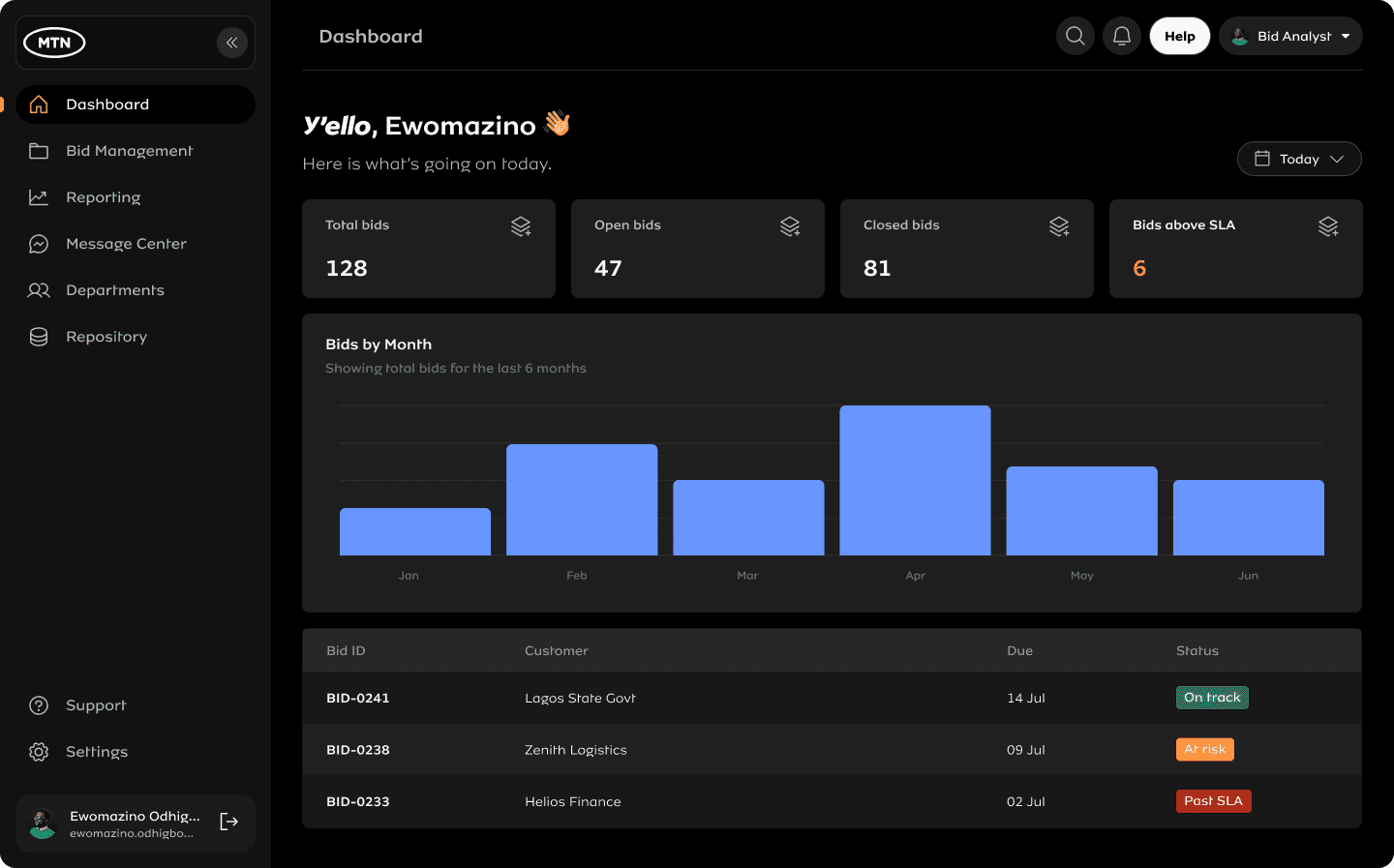
Analyst view: full pipeline, all bids, all statuses, and the only role to see the yellow "New bid request" button. All elements, nav items, metric cards, chart bars, table rows, respond on hover.
Hi-fi, Dept. Stakeholder (Legal)
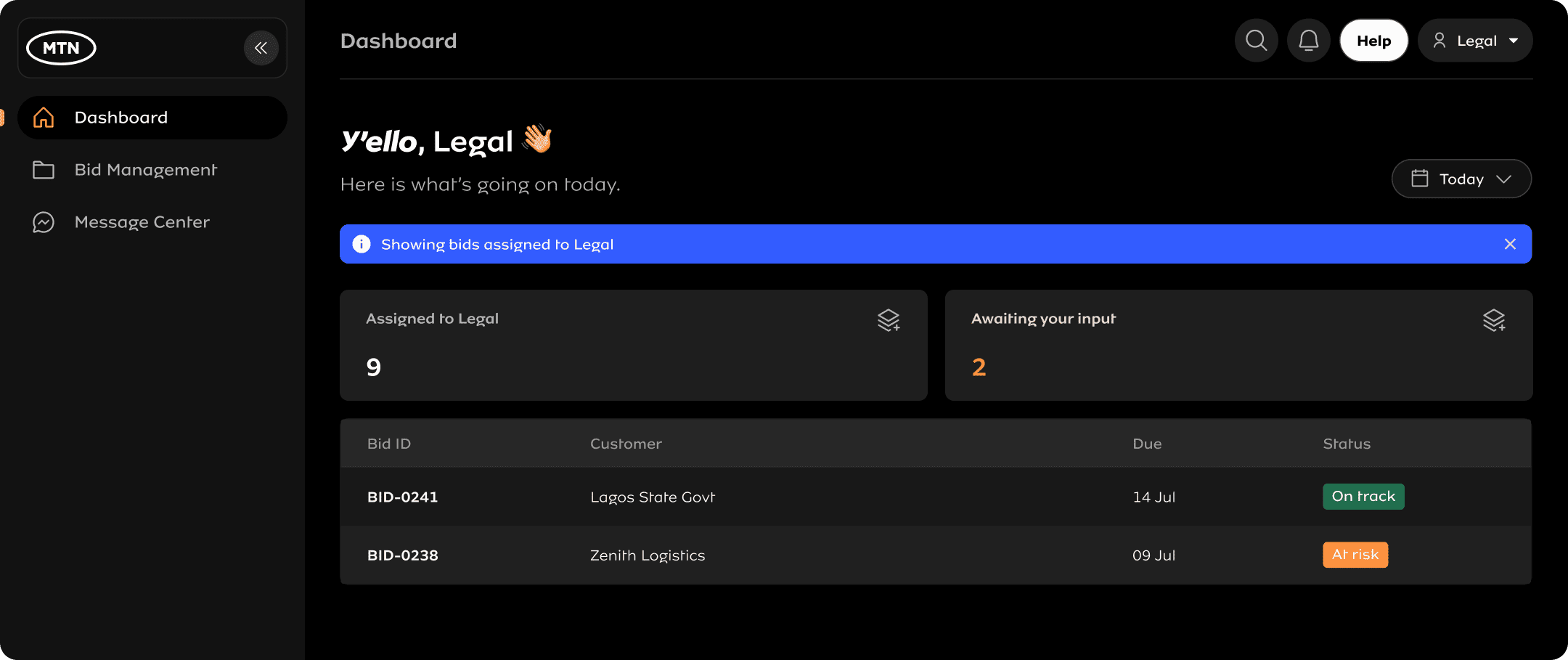
Same shell and nav, scoped to one department. The "Showing bids assigned to Legal" label makes the filtering read as a feature, not missing data — a fix that came directly out of usability testing (see section 06).
Hi-fi, Leadership
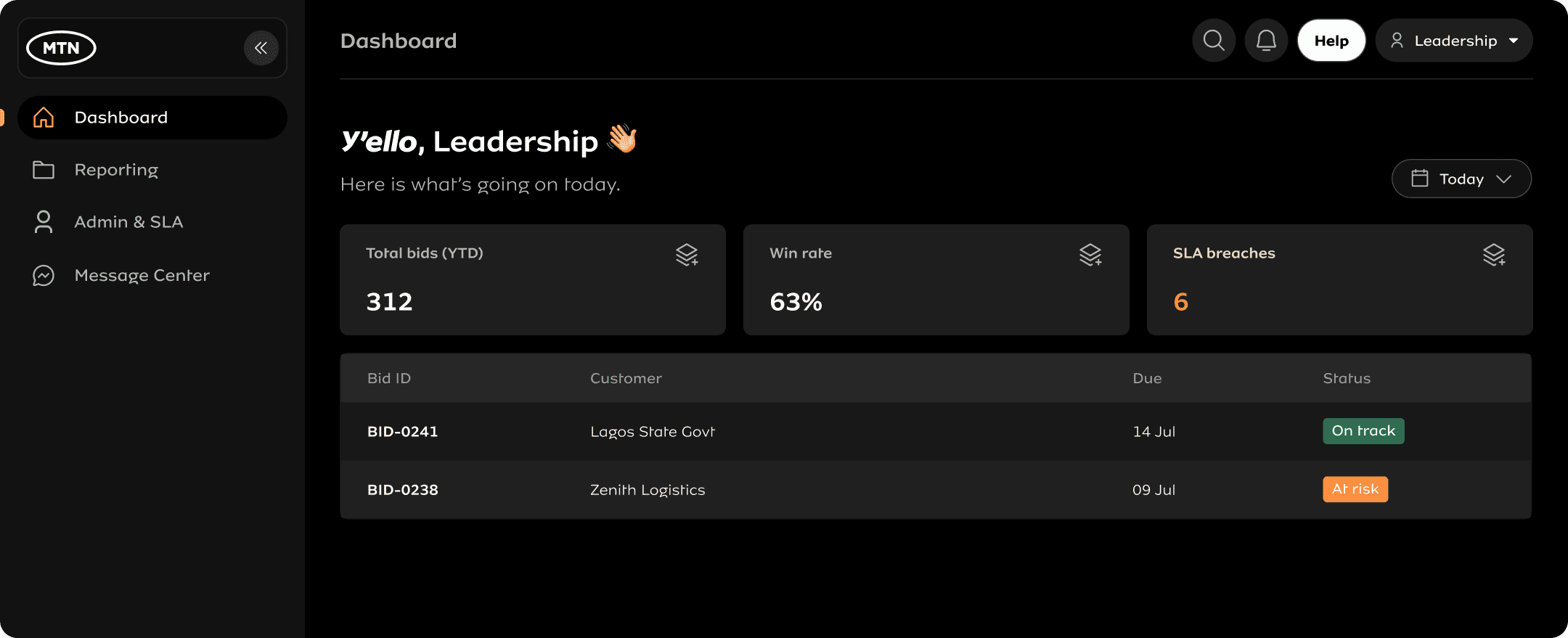
Leadership dashboard: aggregate pipeline by region, win rate, SLA breach count. No bid-level detail, no create action, export only.
B · Bid ManagementThe operational core. Analysts have full control. Stakeholders can only respond to their assigned bids. Leadership has no access.
Lo-fi wireframe
Filter row + searchable sortable table. "New bid request" only in the Analyst variant.
Hi-fi, Bid Analyst (interactive, filter the table below)

| Bid ID | Customer | Dept. | Status | Assigned |
|---|---|---|---|---|
| BID-0241 | Lagos State Govt | Public Sector | On track | T. Bello |
| BID-0238 | Zenith Logistics | Enterprise | At risk | F. Okoro |
| BID-0233 | Helios Finance | Finance | Past SLA | A. Musa |
| BID-0229 | Greenfield Energy | Legal | On track | C. Adeyemi |
| BID-0221 | Access Bank | Finance | At risk | T. Bello |
| BID-0215 | Dangote Group | Enterprise | On track | F. Okoro |
Analyst: full pipeline with live filtering by status, department, and text search. Same status-tag language as the dashboard.
Hi-fi, Dept. Stakeholder (Legal)
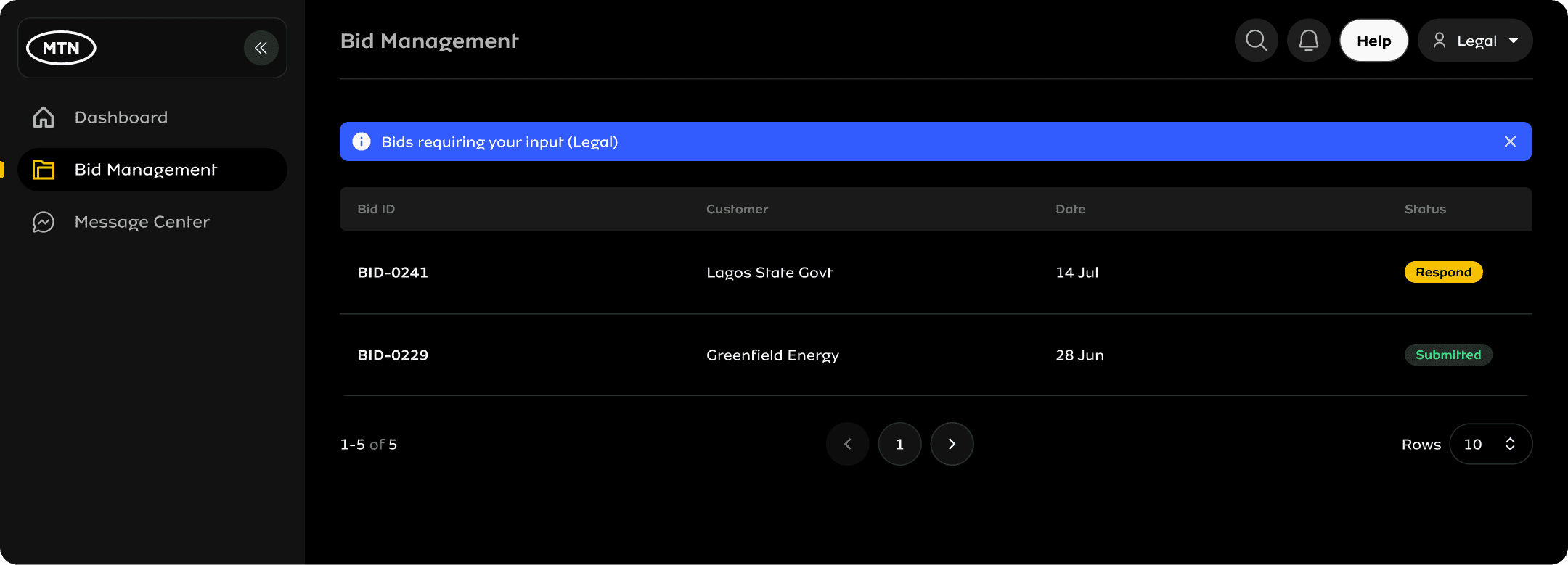
Stakeholder: only their assigned bids, single "Respond" action, no filters, no create button.
Hi-fi, Leadership (no access)
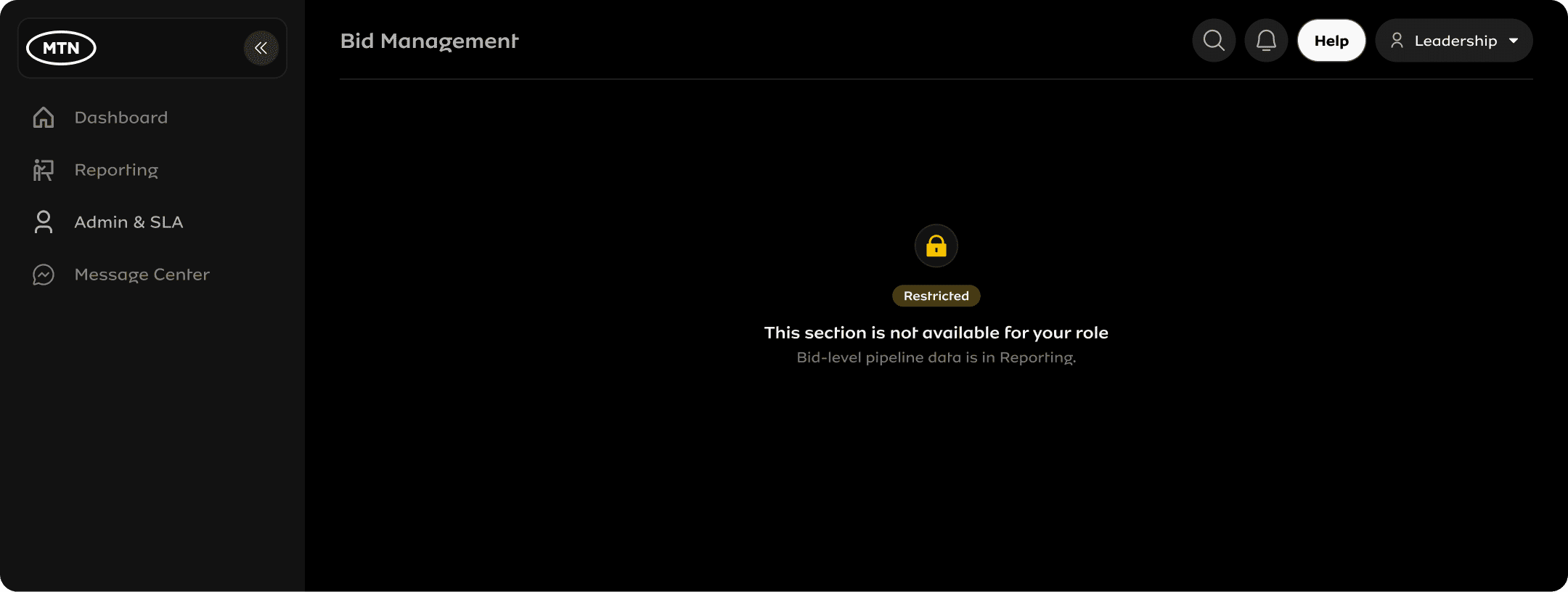
Leadership does not see Bid Management in their nav at all, this is what they'd see if accessing the route directly.
C · ReportingTwo different report types from the same data. Analysts see per-bid operational detail. Leadership sees aggregate strategic trends. Stakeholders have no access.
Hi-fi, Bid Analyst (operational)
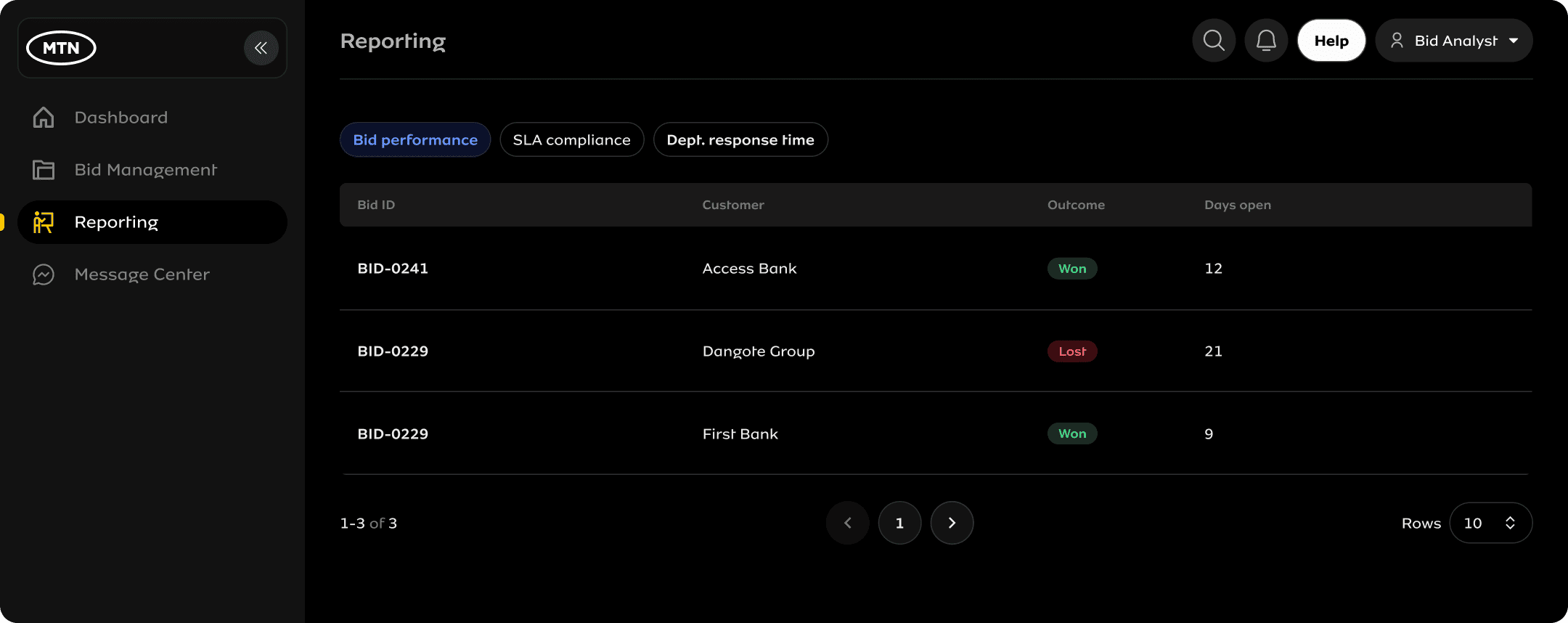
Analyst reporting: per-bid outcomes, SLA compliance, department response times. Exportable to CSV.
Hi-fi, Leadership (strategic)
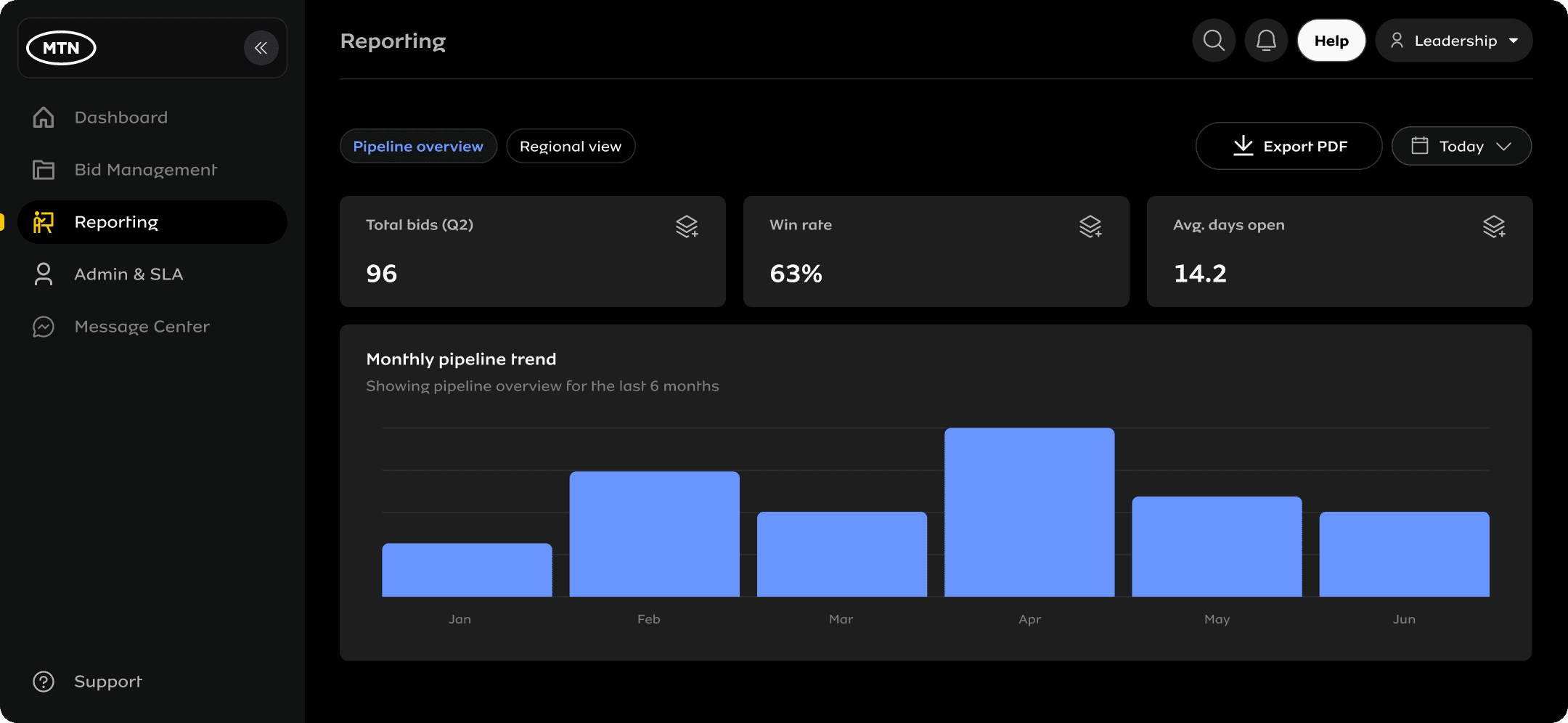
Leadership reporting: pipeline-level aggregate, win rate, regional trends. No per-bid rows, no individual names, PDF export only.
D · Admin & SLALeadership-only. Where the system's SLA promises are configured: admin users, response windows per department, and escalation triggers.
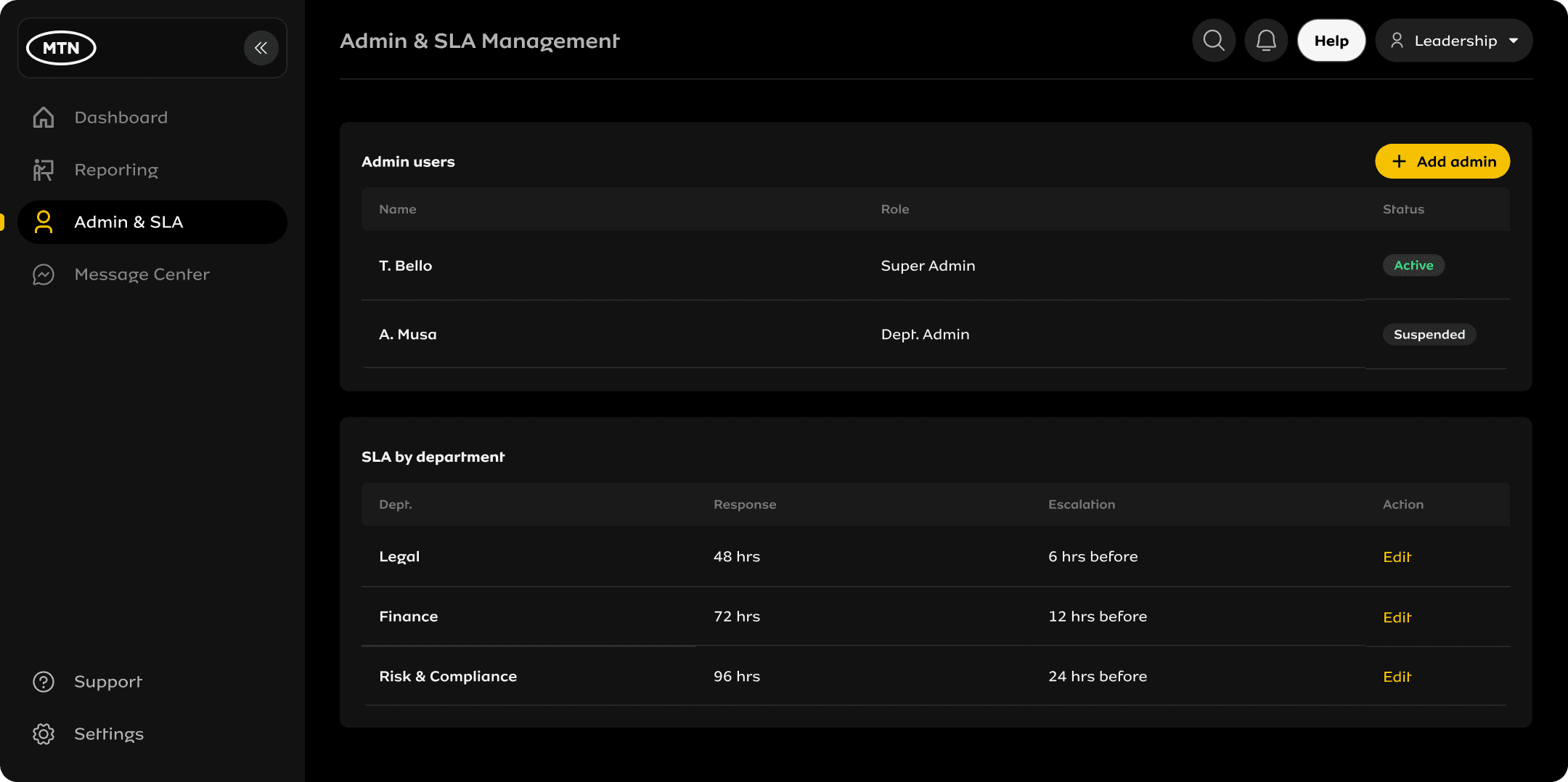
Leadership only. These settings propagate to every dashboard card, status tag, and notification in the system.
E · Message CenterBid-scoped communication threads, all in one place instead of separate email chains.
Hi-fi, Bid Analyst
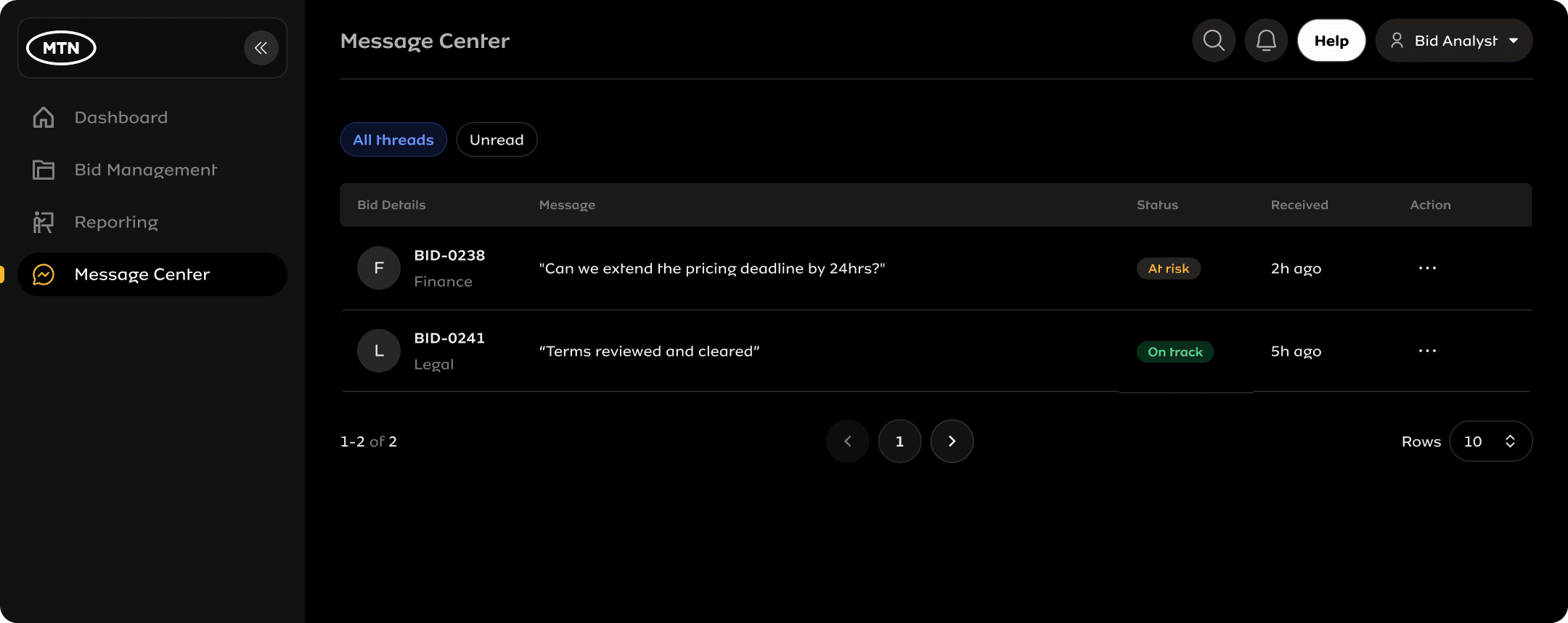
Analyst: all bid threads visible, filterable by unread, with the bid status tag surfaced inline so context is never lost.
F · Edge case, empty state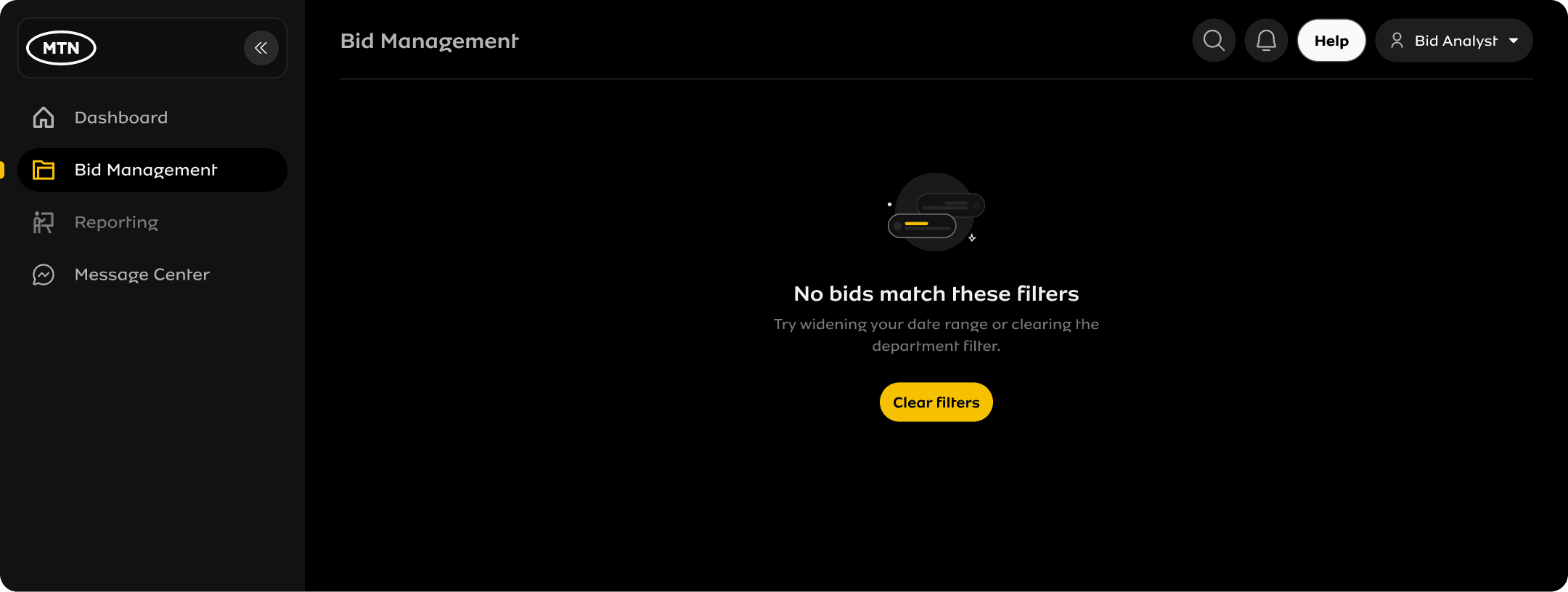
Explains why, not just that. Direct recovery action visible immediately.
G · Bid creation flow, Bid Analyst only (interactive)Three steps: bid details, stakeholder selection, and a mandatory preview before sending. Click through the steps below.
Step 1 of 3
Bid details
Customer name *
Date received *
Due date *
Account partner *
Step 2 of 3
Select stakeholders
Choose every department this bid needs input from.
3 of 13 departments selected
Step 3 of 3
Review before sending
Lagos State Govt
Due 14 Jul 2025 · Received 01 Jul 2025
Bid request sent
BID-0247 created. 3 departments notified, Legal, Finance, and Risk & Compliance.
Step 3 is un-skippable, every field reviewable and editable in place before notifications go out (fix from usability testing, see section 06). "Start over" resets the demo.
AccessibilityThe status system (on track / at risk / past SLA) never relies on colour alone — every tag pairs colour with a text label. Checked with Stark against WCAG 2.1 AA contrast minimums on the dark Raanaa background and against the three most common forms of colour blindness.
Contrast ratios via Stark. Every interactive element, nav items, table rows, form fields, manually tested for keyboard reachability. No mouse-only interactions.
06 — Validation
Testing & iteration
Before launch, I ran moderated usability sessions with five bid analysts and three department stakeholders, walking through the bid creation flow and the dashboard.
| What we tested | What we found | What changed |
|---|---|---|
| Three-step bid creation flow | 2 of 5 analysts didn't notice the preview step and tried to submit directly from step two, missing the chance to catch errors | Added an explicit "Review before sending" label on the step indicator and disabled submit until the preview screen had been viewed |
| Role-scoped dashboard for stakeholders | Stakeholders from Legal and Finance asked "is this all of it?", the scoped view felt incomplete rather than intentional | Added the "Showing bids assigned to Legal" banner so the filtering reads as a feature, not a missing-data bug |
| SLA risk card on the dashboard | Every participant correctly identified it as the most urgent item without prompting | No change, validated the decision to elevate it from the original spec |
Two genuine usability issues surfaced and fixed before launch. One decision validated rather than assumed.
07 — Key Decisions
Trade-offs made explicit
| Decision | Cost | Gain |
|---|---|---|
| One shared dashboard shell, role-scoped, instead of 13 separate dashboards | More complexity in the permissions layer | One system to maintain, consistent mental model, faster onboarding |
| SLA risk elevated to its own metric, not a buried status field | One more element competing for attention | Stakeholders see risk before a deadline is missed, not after |
| Multi-step bid creation with a mandatory preview step | One extra click before submission | Fewer submission errors on requests notifying 13 departments at once |
08 — Outcomes
What shipped, what changed
09 — Reflection
What I'd do differently
If I ran this again, I'd get all thirteen departments in one room before locking the permissions model. A few role-scoping decisions had to be revisited once specific teams, Risk & Compliance especially, surfaced needs that hadn't come up in individual discovery sessions. One alignment workshop early on would likely have saved a full redesign cycle on the permissions architecture.
I'd also pull SLA configuration into scope from day one. It became one of the most valuable parts of the system, but because it was added after the dashboard and creation flow were already largely locked, retrofitting the "at risk" logic was more constrained than it needed to be.